If you split your year between Canada and the US in an RV, you already know the internet situation is complicated. Campground WiFi is unreliable, cellular coverage has dead zones on both sides of the border, and managing two different mobile plans gets expensive fast.
Starlink changes the equation. One dish, one subscription, satellite coverage across both countries. And since July 2026, the rules are simpler than they used to be: the old 2-month international roaming limit no longer applies to trips between the US and Canada.
How Starlink works across the US-Canada border
The hardware side is simple. Your Starlink dish connects to low-earth-orbit satellites overhead regardless of which country you are standing in. There is no manual switching, no SIM card to swap, and no border-specific configuration. You pack up in Ontario, drive to Florida, set up the dish, and it connects.
The account side used to be the tricky part. Every Starlink account has a registered home country, and snowbirds who spent 4 to 6 months on the "wrong" side of the border regularly ran past the old 2-month roaming allowance.
That changed on July 14, 2026 for new customers and August 17, 2026 for existing ones. Starlink now treats the United States, Canada and US territories as a single home region, so travel anywhere inside it counts as domestic on every Roam plan (MobileSyrup, Mobile Internet Resource Center). For a US-Canada snowbird, the roaming clock simply stops being a concern.
The plans that work for cross-border travel
You need a Roam plan to use Starlink while traveling. US prices:
- Roam 100GB ($55/month). Good for light users who mainly need email, web browsing, and occasional streaming. After 100GB you drop to "basic access" (under 1 Mbps) until the billing cycle resets.
- Roam 300GB ($80/month). Enough for most solo travelers and couples, with the same US/Canada coverage.
- Roam Unlimited ($175/month). No data cap, and the only Roam plan that still works outside the US/Canada region (30 days per trip). This is what heavy streamers and anyone heading on to Mexico choose.
All three cover the whole US/Canada region. Canadian accounts are billed in Canadian dollars at their own price list.
Residential plans ($55, $85 or $130 per month in the US) are tied to a fixed home address and only get best-effort service away from it, so they are not designed for travel. If you want to pick the best plan for your situation, compare the Roam tiers carefully.
What replaced the 2-month rule
The old rule worked like this: your account had a registered home country, you could use the dish in another country for about 2 months, and after that Starlink could ask you to move your service address or restrict service. Snowbirds worked around it by switching their address every season, pausing service, or even keeping two accounts.
For US-Canada travel, none of that is needed anymore. Here is how the current rules break down:
- Inside the US/Canada region: every Roam plan works with no time limit, whichever country your account is registered in
- Outside the region (Mexico, the Bahamas, the rest of the Caribbean): Roam 100GB and 300GB stop working. Only Roam Unlimited works abroad, for 30 days per trip
- Longer stays abroad: Starlink points travelers to Priority plans, which allow more time outside the home region
Strategies snowbird RVers use now
Option 1: Keep one account where you live. Register in the country where you live and bank. The region rule covers your time on the other side of the border, and you avoid currency conversion fees.
Option 2: Use Standby Mode at home. Snowbirds with fixed broadband at a home base can switch Starlink to Standby Mode for those months. In the US it costs $10/month and gives basic access only, and it cannot be used while driving. Switch back to a full Roam plan when you hit the road.
Option 3: Plan for Mexico separately. If your winters run south of the US border, budget for Roam Unlimited and watch the 30-day limit per trip.
Coverage along popular snowbird routes
Starlink covers every Canadian province and the continental United States. There are no coverage gaps along any major snowbird corridor.
Ontario to Florida (I-75 corridor)
The most popular snowbird route has complete coverage from Toronto through Michigan, Ohio, Kentucky, Tennessee, Georgia, and into Florida. Florida RV parks can experience congestion during peak snowbird season (January through March) when thousands of Starlink users concentrate in the same area.
Alberta and BC to Arizona and California
Full coverage through the mountain passes and down through the desert Southwest. Arizona performs particularly well because low population density means less satellite congestion. California coastal areas can be slower due to higher user density.
Maritimes to the Southeast US
Less-traveled routes often deliver the best Starlink performance. Maritime provinces have strong coverage with relatively few users, and the mid-Atlantic corridor through to the Carolinas works well.
What affects performance more than borders
The country you are in matters less than these factors:
- Sky obstructions — tall trees at campsites cause more problems than anything else. Use the Starlink app obstruction tool before setting up
- User density — popular RV parks with many Starlink dishes share satellite capacity. Rural boondocking spots are usually faster
- Time of day — evening hours (7-11 PM) see peak usage in populated areas
- Weather — heavy rain and wet snow affect the signal in both countries equally. Check our guide on Starlink in cold weather and rain for details
Typical speeds for Roam plan users in both countries range from 25 to 150 Mbps download and 5 to 25 Mbps upload. Rural and western areas tend to be faster. Urban and heavily-visited regions tend to be slower.
Setting up your Starlink for cross-border travel
Hardware considerations
Both the Standard Gen 3 dish and the Starlink Mini work in Canada and the US. There is no hardware difference between countries — the same dish connects to the same satellite constellation.
For snowbird RVers, mounting matters. A secure mount that survives highway driving and sets up quickly at each stop saves time and frustration. Check our no-drill mount guide for options that work well for frequent travelers.
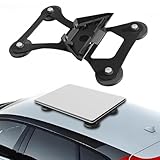
Lymorexan Magnetic Roof Mount (Mini)
Magnetic Mount
$39.98
Amazon price when we checked on Oct 9, 2026
Check today's price on Amazon(opens Amazon in a new tab)This magnetic mount fits the Starlink Mini only. Magnets need a steel surface, so on an aluminum or fiberglass RV roof you have to bond steel plates to the roof first.
Power setup is the other consideration. If you boondock along your snowbird route, you need a reliable way to power the dish off-grid. The Standard dish draws 75-100W on average and the Mini draws 20-40W. A good portable power station or solar panel setup handles this easily.

Anker SOLIX C300 (288 Wh)
Power Station
$329.99
Amazon price when we checked on Oct 9, 2026
Check today's price on Amazon(opens Amazon in a new tab)A compact 288Wh station like the Anker SOLIX C300 runs a Mini for roughly 6-12 hours. Its 140W USB-C ports clear the Mini's 100W USB-C requirement. A Standard dish needs a 1,000Wh-class station for a full day.
What to do at the border
There is nothing Starlink-specific you need to do when crossing the US-Canada border. The dish is legal to bring across in both directions. Canadian customs does not restrict Starlink hardware — the equipment is certified by Innovation, Science and Economic Development Canada (ISED) and sold in Canada.
In your Starlink app:
- Your dish will automatically connect to satellites in the new country
- No address change is needed for US-Canada travel on any Roam plan
- If you are continuing on to Mexico, confirm you are on Roam Unlimited before you cross
No firmware changes, no SIM swaps, no phone calls to Starlink support.
Canadian vs US pricing and billing
Starlink prices differ between the two countries, and billing happens in the currency of your registered address.
| Item | US price (USD) | Canada |
|---|---|---|
| Roam 100GB | $55/mo | Billed in CAD, check Starlink's Canadian site |
| Roam 300GB | $80/mo | Billed in CAD |
| Roam Unlimited | $175/mo | Billed in CAD |
| Standby Mode | $10/mo | Billed in CAD |
| Hardware (Standard) | $349 | Billed in CAD |
| Hardware (Mini) | $249 list (often $199 on sale) | Billed in CAD |
Because the US and Canada are now one region, there is no longer a roaming reason to register in one country or the other. Register in the country where you live and where your primary bank account is. That keeps billing in your own currency and avoids conversion fees on your card.
Common mistakes snowbird RVers make with Starlink
Following outdated 2-month-rule advice. Plenty of forum posts and older guides still tell snowbirds to swap their service address every season. Since August 17, 2026, US-Canada travel is domestic on every Roam plan, so you can skip that step.
Not checking campsite obstructions. Starlink needs a clear view of the sky. That beautiful tree-covered campsite in the Smokies might deliver 5 Mbps instead of 100 Mbps. Use the Starlink app's obstruction checker before booking long stays.
Assuming a cheap plan works in Mexico. Roam 100GB and 300GB are domestic-only. If your snowbird route continues south of the US border, only Roam Unlimited works there, and only for 30 days per trip.
Forgetting to budget for power. Starlink draws meaningful wattage, especially the Standard dish. If you boondock frequently along your snowbird route, make sure your 12V power setup can handle the load.
Not having a backup. Starlink is excellent but not perfect. Tree cover, severe weather, and rare outages happen. A cellular hotspot as a backup — even a basic prepaid plan — gives you a safety net for the days when satellite internet is not cooperating. Compare Starlink vs cellular for RV use to find the right backup option.

GL.iNet GL-AXT1800 Slate AX
Travel Router
$119.99
Amazon price when we checked on Oct 9, 2026
Check today's price on Amazon(opens Amazon in a new tab)Frequently asked questions
Can I use my US Starlink in Canada
Yes. Starlink now counts the US, Canada and US territories as one home region, so a US-registered dish works in Canada on any Roam plan with no international roaming limit. The change took effect on July 14, 2026 for new customers and August 17, 2026 for existing ones.
What happened to the Starlink 2-month roaming rule
For US-Canada travel it no longer applies. The remaining international limit covers trips outside the region: only Roam Unlimited works abroad, and only for 30 days per trip. Roam 100GB and 300GB are domestic-only.
Do I need a separate Starlink account for Canada
No. A single Roam account works in both countries. Some long-stay snowbirds used to keep two accounts to dodge the old roaming limit, but that is no longer necessary.
How much does Starlink cost for snowbird RVers
In the US, Roam 100GB is $55/month, Roam 300GB is $80/month and Roam Unlimited is $175/month. Canadian accounts pay Canadian-dollar prices. Hardware is $249 list for the Mini (often $199 on sale) or $349 for the Standard dish. A full year on Roam 300GB costs $960, or about $2,100 on Roam Unlimited, plus the one-time hardware cost. Standby Mode during months at home lowers that.
Does Starlink have good coverage along snowbird routes
Yes. Every major snowbird corridor between Canada and the US has full Starlink satellite coverage. Ontario to Florida, Alberta to Arizona, Maritimes to the Southeast are all covered. Campsite obstructions and congestion at busy parks are the real limits.
What to do next
Now that you understand how Starlink works for cross-border snowbird travel, here are the next steps:
- Choose your plan: Best Starlink plan for RV use in 2026: Mobile vs Residential
- Mount your dish: 7 best no-drill Starlink RV mounts to buy in 2026 (tested and ranked)
- Power off-grid: Best portable power stations for Starlink RV in 2026
- Extend your WiFi: How to extend Starlink WiFi range in your RV
- Get the full kit: Starlink Gen 3 RV accessory checklist for reliable installs
Related reading
- Best Starlink plan for RV use in 2026: Mobile vs Residential
- 7 best no-drill Starlink RV mounts to buy in 2026 (tested and ranked)
- Best portable power stations for Starlink RV in 2026
- Best Starlink RV accessories on Amazon in 2026
- How to extend Starlink WiFi range in your RV
- Starlink Gen 3 RV accessory checklist for reliable installs
- Starlink in cold weather and rain: RV performance tips
- Starlink vs cellular hotspot for RV: which is better
Affiliate disclosure
This page may include affiliate links. If you purchase through them, we may earn a commission at no extra cost to you.