Why 12V power matters for RV Starlink
Starlink is the first truly usable satellite internet for RVers, but it draws real power. If you are boondocking, dry camping, or running off solar, power management is not optional — it determines whether you can keep Starlink running 24 hours a day or have to ration it.
This guide covers the complete 12V power chain: DC direct connections, inverter selection, the Starlink DC power supply accessory, battery bank sizing, and wiring diagrams. If you are specifically shopping for solar panels and charge controllers to keep your batteries topped off, see our dedicated solar panel guide for Starlink RV setups.
The power math is straightforward but unforgiving. The Starlink Standard Gen 3 draws 75–100W continuously. Over 24 hours, that is 1,800–2,400Wh, which translates to roughly 150–200Ah from a 12V battery bank. The Starlink Mini draws 20–40W, or about 480–960Wh per day — roughly 40–80Ah at 12V.
Both numbers assume continuous operation. If you power down overnight or during low-use periods, the daily draw drops proportionally. In cold weather, power consumption increases further due to the dish's snow melt heater — see our cold weather and rain performance guide for winter-specific power budgets.
This guide covers every practical path from your RV 12V system to a running Starlink dish: DC direct connections, inverter setups, solar panel sizing, battery bank planning, and specific product recommendations that the RV Starlink community has tested.
Power consumption: Standard Gen 3 vs Mini
Understanding the exact draw of each Starlink model is the foundation of your power plan.
Starlink Standard (Gen 3)
| Spec | Value |
|---|---|
| Average power draw | 75–100W |
| Peak draw (snow melt, initial acquisition) | Up to 150W |
| Input voltage | 100–240V AC (via included power supply) |
| DC option | Starlink DC power supply accessory (sold separately) |
| 24-hour energy at average | 1,800–2,400Wh |
| 24-hour draw from 12V battery | 150–200Ah |
The Standard requires AC power from the included power supply. That means you either need an inverter to convert 12V DC to 120V AC, or the Starlink DC power supply accessory which converts 12V DC directly.
These are Starlink's published averages for the current Standard dish. Real draw moves with throughput, temperature, and how often the heater runs.
Starlink Mini
| Spec | Value |
|---|---|
| Average power draw | 20–40W (about 15W idle) |
| Peak draw (snow melt, initial acquisition) | Up to 60W |
| Input voltage | 12–48V DC (barrel jack) or AC via included adapter |
| USB-C PD option | 100W minimum, 20V/5A (with accessory cable) |
| 24-hour energy at average | 480–960Wh |
| 24-hour draw from 12V battery | 40–80Ah |
The Mini is designed for portable and off-grid use. It accepts 12V DC natively through its barrel jack connector, which eliminates the inverter entirely. This makes the Mini the obvious choice for boondockers and solar-only setups.
Why the Mini wins on power efficiency
The Mini draws roughly 60–65% less power than the Standard. Over a full day of boondocking, that difference adds up fast:
| Scenario | Standard Gen 3 | Mini | Savings |
|---|---|---|---|
| 24h continuous use at 12V | ~170Ah | ~60Ah | 110Ah |
| Battery capacity needed (with 50% reserve) | 340Ah | 120Ah | 220Ah |
| Solar needed for daily recovery (5 sun hours) | ~480W | ~190W | 290W |
For RVers who primarily need internet for remote work, streaming, and navigation, the Mini delivers more than enough performance at a fraction of the power cost.
Option 1: Power Starlink Mini directly from 12V DC
The simplest and most efficient setup. No inverter, no conversion losses.
Direct wire to RV 12V system
The Starlink Mini accepts 12–48V DC through its barrel jack connector. You can wire it directly to your RV house battery bank using the included 15 m DC power cable.
What you need:
- A fused 12V circuit from your house battery (15A fuse recommended)
- A 12V barrel jack outlet or panel-mount connector near your dish mounting location
- The included Mini DC power cable (15 m / 49.2 ft)
Wiring approach:
- Run a fused 12 AWG wire pair from your battery bank or fuse panel to the exterior mounting area
- Install a weatherproof panel-mount barrel jack connector or a simple 12V DC outlet
- Plug the Mini DC cable into the outlet
This eliminates inverter conversion losses (typically 10–15%), which means more of your stored battery power actually reaches the dish.
Power from USB-C PD power bank
The Mini can also run from a USB-C Power Delivery source using the Starlink USB-C to barrel jack cable accessory.
Requirements:
- USB-C PD power bank with 100W output minimum at 20V/5A
- Starlink USB-C to barrel jack cable (sold in the Starlink Shop)
This is a great backup option but has limitations. Most 100W PD power banks in the 20,000–30,000mAh range hold roughly 75–110Wh, which runs the Mini for only about 2–4 hours before needing a recharge. Lower-rated chargers will not work at all: Starlink says the Mini will not run on USB PD sources rated 65W or lower. It is best used as a portable backup rather than a primary power source.
Recommended power banks for Starlink Mini:
| Power bank | Capacity | USB-C PD output | Approx. Mini runtime | Buy |
|---|---|---|---|---|
| Anker 737 Power Bank (24,000mAh) | 86.4Wh | 140W | ~2.5 hours | — |
| BLUETTI AC2A (204Wh) | 204Wh | 300W AC | ~5 hours | — |
| Anker SOLIX C300 (288Wh) | 288Wh | 300W AC | ~8 hours | Amazon |
For the larger portable power stations (BLUETTI, Anker SOLIX), you can run the Mini from the AC outlet or the 12V DC outlet, both of which work. The Anker SOLIX C300 runs about $315–380.
Option 2: Power Starlink Standard with an inverter
The Standard Gen 3 requires AC power. If you do not have Starlink's DC-DC power supply accessory, an inverter is the most common solution.
Choosing the right inverter
Size: A 300W pure sine wave inverter is the absolute minimum. The Standard draws up to 150W during peak loads, and you want at least 2x headroom for startup surges and reliable long-term operation. A 600W inverter is the sweet spot — it covers Starlink plus a laptop charger or third-party router with no stress.
Type: Always use a pure sine wave inverter. Modified sine wave inverters are cheaper but produce a choppy AC waveform that can cause the Starlink power supply to buzz, run hot, or fail prematurely. The Starlink power supply contains sensitive electronics and expects clean AC input.
Recommended inverters for Starlink RV use:
| Inverter | Wattage | Type | Features | Buy |
|---|---|---|---|---|
| GIANDEL 300W Pure Sine Wave | 300W | Pure sine wave | Compact, USB port, remote switch | Amazon |
| BESTEK 500W Pure Sine Wave | 500W | Pure sine wave | Dual AC outlets, ETL certified | — |
| Renogy 700W Pure Sine Wave | 700W | Pure sine wave | Remote panel, auto low-voltage shutdown | — |
| Victron Phoenix 12/500 | 500W | Pure sine wave | High efficiency (93%), Bluetooth monitoring | — |
| AIMS 600W Pure Sine Wave | 600W | Pure sine wave | UL listed, hardwire capable | Amazon |
If the inverter is running more than Starlink. Everything above is sized for the dish and a laptop. The moment you add a monitor, a coffee grinder, or an induction hob, you are into 2,000W territory — and at that point the feature worth paying for is a built-in UPS transfer switch. When shore power drops, a transfer-switch inverter swaps to battery in milliseconds, fast enough that the Starlink router never reboots and your video call never drops. A plain inverter does not do this; you get a power cut and a two-minute dish reacquisition.
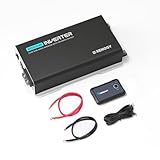
Renogy PUH 2000W Pure Sine Inverter with UPS Transfer
Inverter
The built-in UPS transfer switch is the reason to pick this one: when campground shore power drops, it swaps to battery fast enough that the Starlink router never reboots. 2000W handles the dish plus a laptop and monitor.
$364.99
Amazon price when we checked on Oct 9, 2026
Check today's price on Amazon(opens Amazon in a new tab)
Renogy PUH 3000W Pure Sine Inverter with UPS Transfer
Inverter
Same UPS transfer behaviour as the 2000W with headroom for a microwave or induction hob alongside the dish. Worth the extra if your rig is your full-time office and kitchen.
$461.22
Amazon price when we checked on Oct 9, 2026
Check today's price on Amazon(opens Amazon in a new tab)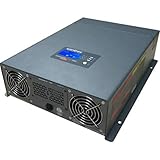
Xantrex Freedom XC 2000 Inverter/Charger
Inverter
A true inverter/charger rather than an inverter alone - it charges the battery bank from shore power and inverts from it, so you wire one box instead of two. The premium pick for a permanent full-time install.
$921.01
Amazon price when we checked on Oct 9, 2026
Check today's price on Amazon(opens Amazon in a new tab)Renogy PUH 2000W Pure Sine Inverter with UPS Transfer
Inverter
The built-in UPS transfer switch is the reason to pick this one: when campground shore power drops, it swaps to battery fast enough that the Starlink router never reboots. 2000W handles the dish plus a laptop and monitor.
$364.99
Amazon price when we checked on Oct 9, 2026
Check today's price on Amazon(opens Amazon in a new tab)The 2000W PUH is the practical starting point for a rig you work from — enough for the dish, a full desk setup, and a microwave, with the transfer switch included rather than sold as an add-on.
Xantrex Freedom XC 2000 Inverter/Charger
Inverter
A true inverter/charger rather than an inverter alone - it charges the battery bank from shore power and inverts from it, so you wire one box instead of two. The premium pick for a permanent full-time install.
$921.01
Amazon price when we checked on Oct 9, 2026
Check today's price on Amazon(opens Amazon in a new tab)The Xantrex is an inverter and a charger in one box: it inverts from the battery bank when you are off-grid and charges the bank when you are plugged in. That halves the number of components in a permanent install, which is why it is the usual pick for a full-time build despite costing roughly three times as much.
Inverter wiring tips
- Wire gauge matters. A 600W inverter at 12V draws up to 50A. Use 4 AWG wire for runs over 3 ft. Use 6 AWG for runs under 3 ft
- Fuse both positive leads — one at the battery and one at the inverter
- Keep the wire run short. Every foot of wire adds resistance and voltage drop. Mount the inverter as close to the battery bank as practical
- Dedicated circuit. Wire the inverter to a dedicated breaker or fuse on your battery bank. Do not share with high-draw appliances like microwaves or air conditioners
Conversion efficiency loss
Inverters are not 100% efficient. A typical pure sine wave inverter converts 12V DC to 120V AC at 85–93% efficiency. That means 7–15% of your stored battery energy is lost as heat during conversion.
For Starlink Standard at 100W:
- Actual battery draw through inverter: ~110–118W
- Over 24 hours: ~2,640–2,832Wh instead of 2,400Wh
- Extra battery drain: ~20–36Ah at 12V
This is why powering the Mini directly from DC is so much more efficient.
Option 3: Starlink DC power supply accessory
Starlink sells a Standard DC-DC Power Supply for the Standard (Standard 4 / 4X) kit that accepts 12–48V DC input through XT60 connectors. It costs about $110 and is only sold in select markets, so check the Starlink Shop for your region. This eliminates the need for an inverter entirely. Starlink's pricier Advanced Power Supply (about $200) also takes DC input and adds a LAN port for third-party routers.
Why this matters:
- No inverter conversion losses
- No inverter fan noise
- One fewer device in the power chain
- More reliable (fewer failure points)
Installation:
- Use the DC-DC supply in place of AC wall power, following Starlink's setup guide for how it connects to your dish and router
- Wire the DC power supply to your RV 12V system with a fused circuit sized to Starlink's instructions
- Keep the 12V run short and heavy (the accessory uses 12 AWG wire), because the supply pulls high current at 12V
This is the ideal setup for the Standard dish in an RV. The DC accessory is sold in the Starlink Shop where available. If you are building a new Starlink RV installation, order the DC power supply accessory with your kit.
Solar panel sizing for Starlink RV
Solar is the primary way most boondocking RVers keep their batteries charged for Starlink. Sizing your solar array correctly is the difference between 24/7 uptime and running out of power by mid-afternoon.
The math
Solar panel output depends on sun hours. In most of the continental US during camping season (April through October), you can expect 4–6 peak sun hours per day. Peak sun hours represent hours of full-rated output — a 100W panel produces 100W for each peak sun hour.
For Starlink Standard (100W average):
- Daily consumption: ~2,400Wh
- Solar needed at 5 peak sun hours: 2,400 ÷ 5 = 480W of panels
- Add 20% for system losses (wiring, charge controller, temperature): ~575W recommended
- Practical recommendation: 400–600W of roof-mounted panels
For Starlink Mini (40W average):
- Daily consumption: ~960Wh
- Solar needed at 5 peak sun hours: 960 ÷ 5 = 192W of panels
- Add 20% for system losses: ~230W recommended
- Practical recommendation: 200–300W of roof-mounted panels
These numbers assume Starlink is your only significant daytime load. If you are also running a fridge, laptop, lights, and fans, add those loads to the total.
Recommended solar panels for RV roofs
| Panel | Wattage | Type | Size | Weight | Buy |
|---|---|---|---|---|---|
| Renogy 200W N-Type | 200W | Rigid | 49.7 x 30.1 in | 23.4 lbs | Amazon |
| Rich Solar 200W Monocrystalline | 200W | Rigid | 58.7 x 26.8 in | 24.3 lbs | — |
| BougeRV 200W Flexible | 200W | Flexible | 56.2 x 26.5 in | 8.6 lbs | — |
| Renogy 100W Flexible | 100W | Flexible | 48.3 x 21.3 in | 4.2 lbs | — |
| HQST 190W Monocrystalline | 190W | Rigid | 58.3 x 26.6 in | 25.4 lbs | — |
Rigid vs flexible: Rigid panels are more efficient, last longer, and run cooler. Flexible panels save weight and work on curved roofs but degrade faster due to heat buildup. If you have flat roof space, rigid panels are the better long-term investment.
Buy the kit, not the panels. Sourcing panels, a controller, brackets, and cabling separately usually costs more than a complete kit and leaves you matching connectors yourself. For a Standard Gen 3 dish you want 400W, which is roughly double the dish's daily draw — the margin covers conversion losses, cloudy days, and a shorter solar window in winter:

Renogy 400W 12V Premium Solar Kit with 40A MPPT
Solar Panel
400W of roof solar replaces roughly what a Gen 3 dish consumes in a day of good sun, so the battery bank ends each day where it started. Amazon's Choice in the category and the most-reviewed complete kit.
$637.99
Amazon price when we checked on Oct 9, 2026
Check today's price on Amazon(opens Amazon in a new tab)
ECO-WORTHY 400W 12V Premium Solar Kit with 40A MPPT
Solar Panel
The budget route to the same 400W target, about $200 under the Renogy kit. Same 40A MPPT controller and Bluetooth module; panel build quality is the trade-off.
$427.49
Amazon price when we checked on Oct 9, 2026
Check today's price on Amazon(opens Amazon in a new tab)
EcoFlow 400W Portable Foldable Solar Panel
Solar Panel
Folding panel you aim at the sun instead of bolting to the roof - which is the point when you are parked in shade for the trees and need the dish to stay up. Pairs directly with EcoFlow power stations.
$699.00
Amazon price when we checked on Oct 9, 2026
Check today's price on Amazon(opens Amazon in a new tab)Renogy 400W 12V Premium Solar Kit with 40A MPPT
Solar Panel
400W of roof solar replaces roughly what a Gen 3 dish consumes in a day of good sun, so the battery bank ends each day where it started. Amazon's Choice in the category and the most-reviewed complete kit.
$637.99
Amazon price when we checked on Oct 9, 2026
Check today's price on Amazon(opens Amazon in a new tab)Four 100W panels with a 40A MPPT controller, Bluetooth module, brackets, and cabling in one box. The most-reviewed complete kit in the category and an Amazon's Choice pick.
ECO-WORTHY 400W 12V Premium Solar Kit with 40A MPPT
Solar Panel
The budget route to the same 400W target, about $200 under the Renogy kit. Same 40A MPPT controller and Bluetooth module; panel build quality is the trade-off.
$427.49
Amazon price when we checked on Oct 9, 2026
Check today's price on Amazon(opens Amazon in a new tab)The same 400W target and the same 40A MPPT controller for roughly $100 less. Panel build quality is the trade-off — reviewers report more frame and junction-box variability than Renogy — but for a rig you are not keeping for a decade the maths favours it.
MPPT vs PWM charge controllers
Your charge controller sits between the solar panels and your battery bank. There are two types:
- PWM (Pulse Width Modulation): Less expensive, lower efficiency (75–80%), adequate for small systems under 200W
- MPPT (Maximum Power Point Tracking): More expensive, higher efficiency (95–99%), harvests significantly more power from your panels, especially in partial shade or non-ideal conditions
For a Starlink power system, MPPT is strongly recommended. The 15–20% efficiency gain over PWM translates directly into more usable power from the same panel array.
Recommended MPPT charge controllers:
| Controller | Max solar input | Battery types | Features | Buy |
|---|---|---|---|---|
| Victron SmartSolar 100/20 | 290W at 12V | Lithium, AGM, Gel, Flooded | Bluetooth app, adaptive algorithms | Amazon |
| Renogy Rover 40A MPPT | 520W at 12V | Lithium, AGM, Gel, Flooded | LCD display, RS232 port | Amazon |
| EPever Tracer 3210AN | 390W at 12V | Lithium, AGM, Gel, Flooded | Remote meter option, budget MPPT | — |
Battery bank sizing for Starlink
Your battery bank is the buffer between solar production and Starlink consumption. Size it wrong and you run out of power overnight.
How to calculate battery capacity
Start with your daily Starlink consumption and add a safety margin for cloudy days and overnight use.
Formula: Daily Wh ÷ battery voltage ÷ usable capacity percentage = minimum battery Ah
For Starlink Standard (2,400Wh/day):
- 2,400 ÷ 12V ÷ 0.80 (lithium) = 250Ah minimum
- With one cloudy day buffer: 400–500Ah recommended
For Starlink Mini (960Wh/day):
- 960 ÷ 12V ÷ 0.80 (lithium) = 100Ah minimum
- With one cloudy day buffer: 200Ah recommended
Lithium vs AGM for Starlink RV
| Feature | Lithium (LiFePO4) | AGM |
|---|---|---|
| Usable capacity | 80–100% of rated Ah | 50% of rated Ah |
| Cycle life | 2,000–5,000 cycles | 300–500 cycles |
| Weight | ~30 lbs per 100Ah | ~65 lbs per 100Ah |
| Charge speed | 0.5C–1C (fast) | 0.1C–0.2C (slow) |
| Upfront cost | Higher | Lower |
| Cost per cycle | Lower | Higher |
| Cold weather charging | Needs low-temp cutoff (most have it built in) | Charges fine in cold |
For a dedicated Starlink power system, lithium is the clear winner. You need 50% less physical battery capacity compared to AGM because you can use 80–100% of the rated capacity. The weight savings are substantial — a 200Ah lithium battery weighs about 60 lbs vs 130 lbs for the equivalent usable capacity in AGM.
Recommended lithium batteries for Starlink RV use:
| Battery | Capacity | Weight | BMS features | Price range | Buy |
|---|---|---|---|---|---|
| Battleborn 100Ah 12V | 100Ah | 31 lbs | Internal BMS, low-temp cutoff | $$$ | — |
| LiTime 100Ah 12V | 100Ah | 24.3 lbs | Internal BMS, low-temp cutoff | $$ | Amazon |
| Renogy 200Ah 12V Smart | 200Ah | 52.9 lbs | Bluetooth monitoring, self-heating | $$$ | — |
| SOK 206Ah 12V | 206Ah | 47 lbs | Internal BMS, Bluetooth optional | $$ | — |
| Ampere Time 200Ah 12V Plus | 200Ah | 44.1 lbs | Internal BMS, low-temp cutoff | $$ | — |
The three worth actually buying right now. LiTime dominates this category on price per usable watt-hour, and the three variants below differ mainly in case size and whether you get Bluetooth monitoring. All are 100Ah / 1,280Wh, which is roughly 13–17 hours of a Standard Gen 3 dish at its 75–100W average, or about 32–64 hours of a Mini at 20–40W.

LiTime 12V 100Ah LiFePO4 Group 31
Lithium Battery
The most-reviewed 100Ah LiFePO4 on Amazon. 1,280Wh runs a Gen 3 dish at ~45W for roughly 24 hours from a single battery, so it is the baseline upgrade for anyone who wants Starlink online overnight without a generator.
$302.39
Amazon price when we checked on Oct 9, 2026
Check today's price on Amazon(opens Amazon in a new tab)
LiTime 12V 100Ah LiFePO4 Group 27 Bluetooth
Lithium Battery
Same 1,280Wh capacity with Bluetooth state-of-charge monitoring, which matters when you are rationing power between the dish and everything else. Group 27 case fits most RV battery trays without modification.
$355.99
Amazon price when we checked on Oct 9, 2026
Check today's price on Amazon(opens Amazon in a new tab)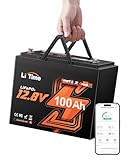
LiTime 12V 100Ah LiFePO4 Group 24 Bluetooth
Lithium Battery
Highest-rated of the LiTime line and the smallest footprint of the three, so it drops into tight travel-trailer battery boxes where a Group 31 will not fit.
$365.99
Amazon price when we checked on Oct 9, 2026
Check today's price on Amazon(opens Amazon in a new tab)LiTime 12V 100Ah LiFePO4 Group 31
Lithium Battery
The most-reviewed 100Ah LiFePO4 on Amazon. 1,280Wh runs a Gen 3 dish at ~45W for roughly 24 hours from a single battery, so it is the baseline upgrade for anyone who wants Starlink online overnight without a generator.
$302.39
Amazon price when we checked on Oct 9, 2026
Check today's price on Amazon(opens Amazon in a new tab)The most-reviewed 100Ah LiFePO4 on Amazon by a wide margin. Group 31 is the largest of the three cases — measure your battery tray before ordering.
LiTime 12V 100Ah LiFePO4 Group 27 Bluetooth
Lithium Battery
Same 1,280Wh capacity with Bluetooth state-of-charge monitoring, which matters when you are rationing power between the dish and everything else. Group 27 case fits most RV battery trays without modification.
$355.99
Amazon price when we checked on Oct 9, 2026
Check today's price on Amazon(opens Amazon in a new tab)Same capacity with Bluetooth state-of-charge reporting. Worth the small premium: when you are rationing power between the dish and everything else, guessing at remaining capacity is how you end up with a dead bank at 9pm.
LiTime 12V 100Ah LiFePO4 Group 24 Bluetooth
Lithium Battery
Highest-rated of the LiTime line and the smallest footprint of the three, so it drops into tight travel-trailer battery boxes where a Group 31 will not fit.
$365.99
Amazon price when we checked on Oct 9, 2026
Check today's price on Amazon(opens Amazon in a new tab)The smallest case of the three and the highest-rated. Pick this one if your battery box is tight — a Group 31 will not fit where a Group 24 will.
Charging the bank while you drive. Batteries only help if they refill. An alternator will not properly charge a LiFePO4 bank on its own — the voltage profile is wrong, and on many modern vehicles the smart alternator backs off entirely once the starter battery is topped up. A DC-DC charger fixes both problems:

Smart 30A DC-DC MPPT Charger, Dual Input
DC-DC Charger
Charges the house bank from the alternator while you drive and from solar when parked, on one unit. This is what keeps the dish powered on travel days without idling the engine.
$186.99
Amazon price when we checked on Oct 9, 2026
Check today's price on Amazon(opens Amazon in a new tab)This unit takes alternator input while you drive and solar input when you are parked, so the bank refills on travel days without idling the engine. For rigs that move every few days, it does more for real-world uptime than adding another battery.
Wiring batteries for Starlink
If you are adding dedicated batteries for Starlink, wire them in parallel (positive to positive, negative to negative) to stay at 12V while increasing Ah capacity.
- Use identical batteries (same brand, model, and age)
- Use equal-length cables between batteries
- Fuse each battery's positive terminal
- Connect your load and charge cables to opposite corners of the battery bank (first battery positive, last battery negative) for balanced draw
Complete wiring diagrams
Setup 1: Starlink Mini on 12V DC (simplest)
Battery Bank (12V) → Fuse (15A) → 12V DC outlet → Mini DC cable → Mini dish
Solar Panels → MPPT Controller → Battery Bank
Total components: battery, fuse, outlet, MPPT controller, solar panels. No inverter needed.
Setup 2: Starlink Standard with DC accessory
Battery Bank (12V) → Fuse → Starlink DC-DC Power Supply → Standard dish and router
Solar Panels → MPPT Controller → Battery Bank
Similar to the Mini setup but uses the Starlink DC power supply accessory.
Setup 3: Starlink Standard with inverter
Battery Bank (12V) → Fuse (60A) → Pure Sine Wave Inverter (600W) → AC outlet → Starlink AC Power Supply → Gen 3 Router → Gen 3 Dish
Solar Panels → MPPT Controller → Battery Bank
More components and less efficient but works with the included AC power supply.
Budget breakdown: what each setup costs
| Component | Mini DC setup | Standard DC setup | Standard inverter setup |
|---|---|---|---|
| Starlink kit | $249 (Mini) | $349 (Standard) | $349 (Standard) |
| Roam plan (monthly) | $55–$175 | $55–$175 | $55–$175 |
| DC power supply accessory | — | ~$110 | — |
| Inverter (600W pure sine) | — | — | $80–$200 |
| Lithium battery (200Ah) | $250–$500 | $400–$800 | $400–$800 |
| Solar panels (400W) | $200–$400 | $300–$500 | $300–$500 |
| MPPT charge controller | $100–$180 | $100–$180 | $100–$180 |
| Wiring, fuses, connectors | $40–$80 | $50–$100 | $70–$120 |
| Total (first year, 12 months of Roam) | $1,499–$3,509 | $1,969–$4,139 | $1,959–$4,249 |
The Mini DC setup is the most affordable path by a wide margin. It uses less solar, less battery capacity, and no inverter.
Common power mistakes to avoid
Using a modified sine wave inverter. The Starlink power supply expects clean AC. Modified sine wave inverters cause humming, heat buildup, and premature failure. Always use pure sine wave.
Undersizing wire gauge for the inverter. A 600W inverter at 12V draws 50A. That requires 4–6 AWG wire. Using thinner wire creates voltage drop, heat, and fire risk.
Running Starlink through your RV converter/charger. When your RV is plugged into shore power, the converter charges the house batteries. Running Starlink through the inverter while on shore power means double conversion (AC → DC → AC), which wastes energy. Wire a dedicated AC outlet for shore power as a bypass.
Ignoring parasitic draw. The MPPT controller, inverter (in standby), and battery BMS all draw small amounts of power 24/7. Factor in 10–20W of parasitic draw when sizing your system.
Failing to fuse battery connections. Every positive wire connected to a battery bank needs a fuse within 12 inches of the battery terminal. Unfused connections are a fire hazard.
Draining lithium below 20%. While lithium batteries can technically discharge to near 0%, regularly doing so reduces cycle life. Set your BMS low-voltage cutoff to 20% for maximum battery lifespan.
What to do next
- Choose a mount for your dish with Best no drill Starlink RV mounts in 2026
- Route your cables cleanly with Starlink RV cable routing guide for reliable installs
- Compare the Mini and Standard in Starlink Mini vs Gen 3 for RV use
- See the complete accessory checklist in Gen 3 RV accessory checklist
Related reading
- RV inverter sizing for Starlink and a mobile office
- Best RV lithium battery for Starlink off-grid
- Best solar panels for Starlink RV
- Best no drill Starlink RV mounts
- Starlink RV cable routing guide
- Starlink Mini vs Gen 3 for RV
- Gen 3 RV accessory checklist
Affiliate disclosure
This page may include affiliate links. If you purchase through them, we may earn a commission at no extra cost to you.