What is Starlink RV in motion and why does it matter?
Starlink RV in motion means exactly what it sounds like — satellite internet that works while your RV is rolling down the highway. No pulling over to set up a dish. No waiting for a connection at the next campground. You have internet at 65 MPH the same way you have it parked at a campsite.
For RVers who work remotely, travel with kids streaming content in the back seat, or need real-time navigation and weather data on long hauls, Starlink RV in motion eliminates the dead zones between stops. Your passengers can join Zoom calls, upload files, or stream music without relying on spotty cellular coverage through rural stretches.
Until recently, in-motion satellite internet was a $5,000+ proposition reserved for commercial fleets and luxury yachts. Starlink brought the hardware cost under $500 for most setups and in-motion-capable service down to $55 a month. That changes the math for every RVer.
The same in-motion hardware works on a Class 8 rig, though the mounting and 12V wiring differ enough to need their own playbook — see our Starlink for semi trucks guide if you are outfitting a truck cab rather than an RV.
This guide covers everything you need for a complete Starlink in motion setup RV owners can follow step by step: which dish to buy, which plan to choose, how to mount and power the system, what speeds to expect on the road, and three complete setups at different budgets. If reliable RV internet while driving is your goal, you are in the right place.
Which Starlink dish works while driving?
Three current Starlink dishes work for in-motion use when they are secured on an approved mount. They differ significantly in price, weight, field of view, and power consumption. (The Standard Actuated Gen 2 is discontinued and its motorized base is not recommended for driving.)
| Feature | Standard Gen 3 | Starlink Mini | Performance (Gen 3) |
|---|---|---|---|
| Price | $349 | $249 list (often $199 on sale) | $1,999 |
| Weight | 6.4 lbs (dish only) | 2.43 lbs | 11.5 lbs |
| Field of view | 110° | 110° | 140° |
| Power draw (average) | 75–100W | 20–40W | 70–100W |
| In-motion use | Yes, on a secured mount | Yes | Yes, built for it |
| WiFi | WiFi 6 (separate router) | WiFi 5 (built in) | Built-in WiFi plus router option |
| Best for | Mid-budget balance | Lightweight / low power | Maximum reliability |
Standard Gen 3: the mid-range option
The Gen 3 Standard is the most common Starlink dish in RV setups. At $349, it balances performance and cost. Starlink supports it in motion as long as it sits on a secured, approved mount rather than its kickstand. The 110-degree field of view handles most highway driving well, though sharp turns and heavily treed corridors can cause brief dropouts.
Starlink Mini: lightest and cheapest
The Mini is the easiest dish to add to an RV for in-motion use. At 2.43 lbs, it can sit on a roof mount without structural concerns. Its 20–40W average draw (about 15W idle) means you can run it from 12V DC or a 100W USB-C PD source if needed. The trade-off is WiFi 5 instead of WiFi 6 and a slightly less robust connection in marginal conditions.
Performance (Gen 3): the premium choice
Starlink's old Flat High Performance dish has been renamed Performance (Gen 2) and replaced by the Performance (Gen 3) kit, which is the one to buy today. It is built for vibration, harsh weather and in-motion use, and its 140-degree field of view — about 27% wider than the Standard or Mini — means it holds connections through turns, lane changes, and partial tree cover that would cause the other dishes to drop. The downside: $1,999 hardware cost and a 70–100W average draw, per Starlink's Performance (Gen 3) comparison and spec sheet. It accepts 12–56V DC directly, so no inverter is required.
For a deeper comparison between the Mini and Gen 3 for general RV use, see our Starlink Mini vs Gen 3 comparison.
Starlink Roam plans for in-motion use in 2026
Not every Starlink plan supports in-motion use. Here is what works as of October 2026. The 100 MPH cap is Starlink's maximum supported in-motion speed for Roam and Priority plans, effective March 3, 2026.
| Plan | Monthly cost | Data | In-motion support | Speed cap |
|---|---|---|---|---|
| Roam 100GB | $55 | 100 GB, then basic access (under 1 Mbps) | Yes | 100 MPH |
| Roam 300GB | $80 | 300 GB, then basic access (under 1 Mbps) | Yes | 100 MPH |
| Roam Unlimited | $175 | Unlimited | Yes | 100 MPH |
| Standby Mode | $10 | Basic access only | No | N/A |
Since July 14, 2026, Roam 100GB and 300GB are domestic plans (the US and Canada count as one region). Only Roam Unlimited works abroad, for 30 days per trip, so a drive into Mexico needs Roam Unlimited or a Priority plan.
The Standby Mode change
If you use Standby Mode ($10/month, up from $5) to keep your dish active between trips, be aware that Starlink now treats it as a stationary plan with no in-motion use. Attempting to use Starlink while moving on Standby Mode triggers a "Starlink Disabled while moving" alert. You must activate a Roam plan before hitting the road.
Which plan for in-motion?
For occasional road days between campgrounds, the Roam 100GB plan at $55/month covers navigation, music streaming, and light browsing with plenty left over for camp. A full day of driving uses roughly 2–5 GB depending on activity.
For remote workers who take calls and upload files while a co-pilot drives, Roam 300GB at $80/month is the sweet spot. Most RVers do not burn through 300 GB per month, in motion or parked.
For heavy use — multiple passengers streaming, continuous video calls, or full-time travel with no campground WiFi — Roam Unlimited at $175/month eliminates data anxiety entirely.
See our full comparison of all Starlink RV plans for details on switching between tiers.
How to mount Starlink for permanent in-motion use
In-motion use demands a secure, permanent mount. The dish cannot shift, rattle, or blow off at highway speeds. There are three proven approaches.
Roof mount
A roof mount is the cleanest installation. The dish sits above the roofline with a completely unobstructed sky view in every direction. Most RV roofs can support the weight of any Starlink dish — even the 11.5 lb Performance (Gen 3) is far lighter than a typical RV air conditioner.
Installation tips:
- Use a self-leveling lap sealant (Dicor) around any roof penetrations
- Orient the dish so the cable exits toward the rear of the RV to minimize wind drag on the cable
- Route the cable through an existing refrigerator vent, plumbing stack, or cable port — avoid drilling new holes when possible
- Use cable clips rated for outdoor UV exposure to secure the cable run
Hitch-receiver mount
A hitch mount slides into your rear receiver and positions the dish behind the RV at roofline height. No roof penetrations required.

EEZ RV Starlink Hitch Pole Mount
Hitch Mount
$75.00
Amazon price when we checked on Oct 9, 2026
Check today's price on Amazon(opens Amazon in a new tab)Pros: No roof drilling, easy to remove, dish is accessible from the ground Cons: Blocks the hitch receiver, dish is behind the RV (slight rearward obstruction), vibration at highway speeds can affect signal
Magnetic mount (Mini only)
The Mini's 2.43 lb weight allows magnetic mounting to a steel surface. Most RV roofs are aluminum, fiberglass or membrane, so a magnet mount will not hold there unless you bond steel plates to the roof first. Where it does hold, this is the quickest install — no tools, no drilling, no permanent modifications.
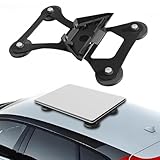
Lymorexan Magnetic Roof Mount (Mini)
Magnetic Mount
$39.98
Amazon price when we checked on Oct 9, 2026
Check today's price on Amazon(opens Amazon in a new tab)Best for: RVers who want in-motion capability without permanent installation. Remove the Mini when you arrive at camp and position it wherever the sky view is best.
For more mounting options that do not require drilling, see our guide to no-drill mounting options.
Powering Starlink while driving
When your RV engine is running, the alternator keeps the house batteries charged, which simplifies the power equation compared to boondocking. But you still need a clean power path from the electrical system to the dish.
Power draw by dish
| Dish | Typical draw (driving) | Daily draw (8 hrs driving) |
|---|---|---|
| Mini | 20–40W | 160–320 Wh |
| Standard Gen 3 | 75–100W | 600–800 Wh |
| Performance (Gen 3) | 70–100W | 560–800 Wh |
Power options
Option 1: Inverter from house batteries Run a pure sine wave inverter from your 12V house battery system. The alternator replenishes the batteries while driving. This is the most common approach and works for all three dishes.
Option 2: Direct 12V DC (Mini and Performance Gen 3) The Mini accepts 12–48V DC power natively (and the Performance Gen 3 accepts 12–56V DC), so you can skip the inverter entirely. Wire it directly to the house battery system through a fused circuit. This eliminates the 10–15% conversion loss of an inverter and is the most efficient setup.
Option 3: Portable power station A portable power station plugged into a vehicle outlet works for occasional use. Keep it charged between drives. A 288 Wh unit like the Anker SOLIX C300 covers roughly 7–14 hours of Mini use at 20–40W, which spans a full driving day:

Anker SOLIX C300 (288 Wh)
Power Station
$329.99
Amazon price when we checked on Oct 9, 2026
Check today's price on Amazon(opens Amazon in a new tab)For a Standard Gen 3 or Performance (Gen 3) dish at 70–100W, a larger station provides more headroom. The 1,070 Wh Jackery Explorer 1000 v2 runs either for roughly 10–15 hours:

Jackery Explorer 1000 v2 (1,070 Wh)
Power Station
$559.00
Amazon price when we checked on Oct 9, 2026
Check today's price on Amazon(opens Amazon in a new tab)For a complete guide to wiring Starlink into your RV's electrical system, read our 12V power setup guide.
Real-world performance: speeds and dropouts on the road
Lab specs are one thing. Here is what actually happens when you drive an RV with Starlink running.
Speed performance at highway speeds
| Metric | Typical range | Notes |
|---|---|---|
| Download | 50–100 Mbps | At 65 MPH on open highway |
| Upload | 3–20 Mbps | Usually under 5 Mbps |
| Latency | 20–40 ms | Good enough for video calls and VoIP |
These numbers are for the continental US on Roam plans. Performance varies by region, time of day, and satellite density overhead.
What causes dropouts
- Bridges and overpasses: 1–3 second interruption as you pass under. Recovers automatically.
- Dense tree canopy: Continuous partial dropouts on heavily forested roads. The Performance (Gen 3) handles this best due to its 140° field of view.
- Sharp turns and U-turns: The dish needs roughly 10 seconds to reacquire satellites after a major heading change. Gentle highway curves cause no issues.
- Tunnels: Complete loss. Reconnects 10–30 seconds after exiting depending on tunnel length.
- Urban canyons (tall buildings): Similar to tree cover — intermittent signal in downtown areas with tall structures on both sides.
Tips for maximizing in-motion reliability
- Choose routes with open sky. Interstate highways through plains and desert perform best. Winding mountain roads through dense forest are worst.
- Use a travel router with cellular failover. A dual-WAN router switches to cellular during Starlink dropouts, keeping video calls alive through brief outages.
- Position the dish as high as possible. Roof mounts outperform hitch mounts because they have fewer obstructions from the RV itself.
- Upgrade to the Performance (Gen 3) if dropouts are unacceptable. The wider 140° field of view makes a measurable difference on tree-lined roads and during turns.

GL.iNet GL-AXT1800 Slate AX
Travel Router
$119.99
Amazon price when we checked on Oct 9, 2026
Check today's price on Amazon(opens Amazon in a new tab)Budget breakdown: three in-motion setups compared
Here are three complete in-motion setups at different price points, including hardware, mounting, and the first month of service.
Budget setup: Mini + magnetic mount + Roam 100 GB
| Component | Cost |
|---|---|
| Starlink Mini | $199–$249 |
| Magnetic roof mount | $20–$40 |
| Cable routing supplies | $15–$20 |
| First month Roam 100 GB | $55 |
| Total | ~$290–$365 |
| Monthly ongoing | $55 |
Best for: Occasional travelers who want in-motion capability without a big upfront investment. The Mini's low power draw means no electrical upgrades needed — a 12V vehicle outlet (via a DC cable) or a USB-C PD power bank that can deliver a full 100W (20V/5A) can run it; 65W banks will not.
Mid-range setup: Standard Gen 3 + hitch mount + Roam Unlimited
| Component | Cost |
|---|---|
| Standard Gen 3 | $349 |
| Hitch-receiver mount | $60–$100 |
| Pure sine wave inverter (if needed) | $50–$100 |
| Cable routing supplies | $15–$20 |
| First month Roam Unlimited | $175 |
| Total | ~$650–$745 |
| Monthly ongoing | $175 |
Best for: Full-time RVers and remote workers who need reliable internet both parked and in motion. WiFi 6 supports more devices, and unlimited data means no monitoring.
Premium setup: Performance (Gen 3) + roof mount + Roam Unlimited
| Component | Cost |
|---|---|
| Performance (Gen 3) | $1,999 |
| Professional roof mount | $100–$200 |
| Wiring and cable routing | $50–$100 |
| First month Roam Unlimited | $175 |
| Total | ~$2,325–$2,475 |
| Monthly ongoing | $175 |
Best for: RVers who depend on continuous connectivity for income — remote workers on video calls, content creators live-streaming, or businesses that cannot tolerate dropouts. The Performance (Gen 3)'s 140° field of view and robust signal handling justify the premium for anyone who needs near-zero interruptions.
Troubleshooting Starlink in-motion issues
"Starlink Disabled while moving" alert
This means your account is on Standby Mode or a Residential plan that does not support in-motion use. Log into your Starlink account, switch to a Roam plan, and restart the dish. The change takes effect within minutes.
Constant disconnections at highway speed
- Check that the dish is securely mounted with no wobble or vibration
- Verify the cable connections are tight — vibration loosens connectors over time
- Use the Starlink app's obstruction viewer while parked to ensure the mount position has clear sky view
- If using a hitch mount, check that the RV body is not blocking a large portion of the sky behind the dish
Slow speeds while driving
- Speeds drop in congested areas where many Starlink users share the same satellite beam. This is a network issue, not a hardware problem
- Check your plan's data cap — Roam 100GB and 300GB drop to basic access (under 1 Mbps) after the cap until the billing cycle resets
- Confirm firmware is up to date in the Starlink app
- The Standard and Mini have narrower fields of view than the Performance (Gen 3), which means more frequent satellite handoffs and brief speed dips during transitions
High power consumption / battery drain
- The Standard Gen 3 and Performance (Gen 3) each average 70–100W. Ensure your alternator and wiring can support this load on top of other RV systems
- Check for a failing inverter — inefficient inverters waste power as heat
- The Mini at 20–40W is a fraction of the larger dishes' draw. Consider switching dishes if power is a constraint
Overheating in summer
All three dishes can overheat in direct sun at high ambient temperatures. The dish throttles performance to protect itself. Symptoms: slow speeds and frequent disconnections on hot days.
- Ensure airflow around the dish — roof mounts with standoffs allow air circulation underneath
- Light-colored dish surfaces reflect more heat. The standard white finish performs better than aftermarket dark covers
- Consider powering down during the hottest midday hours if you are parked and not driving
Related reading
- Compare all Starlink RV plans
- Complete Starlink RV setup guide
- No-drill mounting options for RV
- Power Starlink from your RV 12V system
- Starlink Mini vs Gen 3 comparison
What to do next
Pick the setup tier that matches your budget and travel style from the three options above. If you are starting from scratch, the Mini budget setup gets you in-motion internet for under $365 total — hard to beat for a first test. If you already own a Standard Gen 3, grab a hitch mount and activate a Roam plan to start using it on the road today. For the full hardware breakdown and what ships in each Starlink kit, start with our complete Starlink RV setup guide.
Affiliate disclosure
This page may include affiliate links. If you purchase through them, we may earn a commission at no extra cost to you.