Why van life needs a different Starlink approach
Van life is not the same as RV life. You have a fraction of the roof space, a fraction of the battery capacity, and you need everything to pack down small. A setup designed for a 38-foot fifth wheel with 600Ah of lithium and 600W of roof solar does not translate to a Sprinter van with 200Ah and two 100W panels.
Van lifers also face challenges big-rig RVers do not. Height clearance matters — a permanent dish on the roof can add 4–6 inches that prevent you from entering parking garages, drive-throughs, and certain campground sites. Stealth camping requires a dish that deploys quickly and stows invisibly. And every item competes for limited storage space.
This guide is specifically for vans: Class B motorhomes, converted Sprinters, Promasters, Transits, and any rig where interior space is measured in cubic feet, not cubic yards.
Choosing your Starlink model for van life
Starlink Mini: the van life default
| Spec | Value |
|---|---|
| Weight | 1.10 kg (2.43 lb) |
| Dimensions | 298.5 × 259 × 38.5 mm |
| Power draw | 20–40W average (15W idle) |
| Input voltage | 12–48V DC or USB-C PD (100W source required) |
| WiFi | WiFi 5, dual-band |
| Rating | IP67 weatherproof |
| Price | $249 |
The Mini was essentially designed for this use case. It fits in a laptop bag, runs from 12V DC without an inverter, and draws so little power that a 100Ah battery can run it for over 24 hours without recharging.
Starlink Standard Gen 3: overkill for most vans
The Standard offers faster speeds and WiFi 6, but it draws 75–100W, weighs 2.9 kg, and requires AC power (unless you add a third-party DC conversion kit). For a van with limited battery and solar capacity, the Standard is hard to justify unless you are a full-time remote worker who needs maximum bandwidth.
Use the Standard only if: you have 400Ah+ of battery, 300W+ of solar, and consistently need to support 10+ simultaneous device connections or heavy video streaming.
Mount options for vans
Option 1: magnetic roof mount — best for stealth and simplicity
A magnetic mount sticks to the van's steel roof. You place it when parked and remove it before driving.
Pros:
- Zero drilling or permanent modification
- Deploys in 10 seconds
- Stows flat in a drawer or cabinet
- No added height while driving
Cons:
- Must be removed before driving (magnets are not designed for highway speeds)
- May slide on wet roofs in heavy rain
- Requires steel roof (not aluminum)
Recommended product: Starlink Mini magnetic roof mount, available from multiple Amazon sellers. Look for mounts with at least 40 lb magnetic pull force.
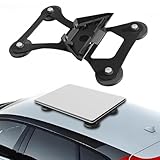
Lymorexan Magnetic Roof Mount (Mini)
Magnetic Mount
$39.98
Amazon price when we checked on Oct 9, 2026
Check today's price on Amazon(opens Amazon in a new tab)Option 2: suction cup window mount — best for no-roof-access setups
Some vans (especially those with roof racks, solar panels, and fans covering the roof) have no space for a roof-mounted dish. A suction cup mount attaches to any window.
Pros:
- Works on any flat glass surface
- No roof access needed
- Easy to reposition
Cons:
- Window placement limits sky view
- Suction cups weaken in temperature extremes
- May not clear obstructions as well as roof-level mounting
Option 3: deployable pole mount — best sky clearance
A telescoping pole that extends from a roof rack, ladder, or hitch receiver gets the Mini above the van roofline.
Pros:
- Excellent sky clearance
- Reduces obstructions from trees and nearby vehicles
- Can extend 6–10 feet above the van
Cons:
- Takes more time to set up and tear down
- Must stow the pole while driving
- Adds hardware and weight
For pole mount options, see our no-drill mount guide.
Option 4: permanent low-profile roof mount
For van lifers who want a set-it-and-forget-it solution, a permanent low-profile mount that sits flat on the roof adds minimal height.
Pros:
- Always ready, no setup or teardown
- Clean look
- No daily maintenance
Cons:
- Adds 2–4 inches to vehicle height
- Requires drilling into roof (or strong adhesive)
- More obstructions from roof-level than elevated mounts
Powering Starlink Mini in a van
Direct 12V DC connection
The Mini accepts 12–48V DC through its barrel jack connector. This is the most efficient way to power it in a van.
Wiring setup:
- Run a 14 AWG wire from your auxiliary battery (through a 5A fuse) to a 12V outlet or direct barrel jack connection near your Starlink storage spot
- Connect the Starlink DC power cable (barrel jack to dish)
- The Mini draws about 1.7–3.3A at 12V — well within the capacity of even the most basic auxiliary battery setups
No inverter needed. This is the key advantage of the Mini for van life. Skipping the inverter saves 10–15% power loss, eliminates the inverter's idle draw (5–15W), and reduces heat and noise inside the van.
Battery sizing for van life
| Daily use pattern | Starlink Mini draw | Battery capacity needed |
|---|---|---|
| 4 hours (casual) | 80–160Wh | 50Ah at 12V |
| 8 hours (work day) | 160–320Wh | 100Ah at 12V |
| 16 hours (heavy use) | 320–640Wh | 200Ah at 12V |
| 24 hours (always on) | 480–960Wh | 200Ah at 12V + solar |
Most van lifers with a 200Ah lithium battery can run the Mini for a full work day and still have capacity for lights, fridge, and device charging.
Solar considerations
| Solar setup | Daily yield (5 sun hrs) | Starlink Mini coverage |
|---|---|---|
| 100W single panel | ~400Wh | Covers 10–20 hrs Mini use |
| 200W dual panel | ~800Wh | Covers up to 24 hrs Mini use |
| 200W + 100W portable | ~1,200Wh | Full Mini coverage + other loads |
A 200W roof-mounted solar setup is the van life sweet spot — it fully covers the Mini's draw on sunny days while leaving capacity for your other electrical needs.
Portable power station alternative
If your van has no auxiliary battery system, a portable power station is the simplest path. A 288Wh LiFePO4 unit like the Anker SOLIX C300 (about $315–$380) runs the Mini for roughly 6–12 hours and recharges from shore power, the van's 12V socket, or a portable solar panel. For all-day use, size up to a larger station.

Anker SOLIX C300 (288 Wh)
Power Station
$329.99
Amazon price when we checked on Oct 9, 2026
Check today's price on Amazon(opens Amazon in a new tab)See our portable power station guide for detailed recommendations.
Daily van life Starlink routine
Morning setup (2 minutes)
- Park with the rear or side facing the most open sky
- Place the Mini on the roof magnetic mount (or extend your pole mount)
- Plug the DC cable into your 12V outlet
- Open the Starlink app and verify connection (usually 1–2 minutes to acquire satellites)
During the day
- Check the Starlink app periodically for obstruction alerts
- If you relocate during the day, you can leave the Mini powered on and let it reconnect at the new spot
- Use the Starlink sleep schedule to disable the dish during errands or hikes to save power
Evening teardown (1 minute)
- Unplug the DC cable
- Remove the Mini from the roof
- Wipe any moisture off the dish with a microfiber cloth
- Store in its protective case or padded drawer
Before driving
Always verify the dish is stowed. A magnetic mount on the roof at highway speed is a safety hazard and will damage the dish. Add "stow Starlink" to your pre-departure checklist.
Storage solutions for small spaces
Dedicated drawer or cabinet slot
Designate a specific spot for the Mini and its cables. The dish is roughly the size of a laptop, so a laptop-sized drawer works perfectly. Keep the DC cable coiled and secured with a velcro strap.

MYZHRE Starlink Cable Routing Kit
Cable Management
Complete cable routing kit with silicone grommets, drill bits, and wall clamps designed specifically for Starlink RV installations.
$16.99
Amazon price when we checked on Oct 9, 2026
Check today's price on Amazon(opens Amazon in a new tab)Padded case
A semi-rigid laptop sleeve or padded case protects the Mini during transit. Look for a case that fits 12–13 inch laptops — the Mini slides in with its cable alongside.
Vertical storage
If drawer space is limited, the Mini can stand vertically in a narrow slot between cabinets or next to the fridge. Use a bungee cord or elastic strap to keep it from sliding during driving.
Optimizing WiFi in a small van
The van's small interior is actually an advantage for WiFi — the Mini's WiFi 5 radio covers a van interior perfectly without dead zones. But there are still optimizations worth making.
Use 5 GHz band
In a van, you are always within 10 feet of the dish. Set your devices to prefer the 5 GHz SSID for maximum speed. The 2.4 GHz band has more interference from campground neighbors.
Add a travel router for features
The Mini's built-in router is basic. A GL.iNet Slate AX or Beryl AX travel router (~$110–$140) adds VPN client, guest network, ad blocking, and better device management. Connect it to the Mini's Ethernet LAN port with the Mini Starlink cable, sold separately (or over WiFi in repeater mode) and use the travel router for WiFi.

GL.iNet GL-AXT1800 Slate AX
Travel Router
$119.99
Amazon price when we checked on Oct 9, 2026
Check today's price on Amazon(opens Amazon in a new tab)See our travel router guide for options.
Outdoor coverage
Need WiFi outside while cooking or lounging? The Mini's signal passes through van walls but weakens quickly. Either position the mini near a window that faces your outdoor area, or use a travel router with an external antenna pointed outside.
Van life Starlink budget
| Item | Cost |
|---|---|
| Starlink Mini hardware | $249 |
| Roam 100GB plan (monthly) | $55 |
| Magnetic roof mount | $20–$40 |
| DC power cable | $0 (included) or $25 (accessory) |
| Padded storage case | $15–$25 |
| Total first month | $339–$394 |
| Monthly ongoing | $55 |
Optional upgrades:
| Item | Cost |
|---|---|
| Travel router (GL.iNet Slate AX) | $110–$140 |
| 100W portable solar panel | $150–$200 |
| Portable power station (288Wh, Anker SOLIX C300) | $315–$380 |
What to do next
Start with the Mini, a magnetic mount, and a direct 12V connection. This gives you a complete van life internet solution for under $400 that deploys and stows in minutes.
- Compare Starlink Mini vs Standard in Starlink Mini vs Gen 3 for RV
- Size your power system in Best 12V power setup for Starlink RV
- Find clear sky at campsites in Starlink RV obstruction tips
- Choose the right plan in Starlink RV plans and pricing 2026
- Protect your investment with RV insurance coverage for Starlink
Related reading
- Starlink Mini vs Gen 3 for RV
- Best 12V power setup for Starlink RV
- Starlink RV obstruction tips
- Best no-drill Starlink RV mounts
Affiliate disclosure
This page may include affiliate links. If you purchase through them, we may earn a commission at no extra cost to you.