If you are weighing your Starlink RV mounting options, start with two questions before you buy any hardware: which dish do you have, and do you want a permanent or temporary setup. The standard actuated Gen 3 dish and the smaller Starlink Mini mount very differently, and the Gen 3 has a gotcha that catches new buyers — it has no built-in pole mount. There are five main ways RVers put a dish in the sky: hitch, ladder, pole/tripod, roof/permanent, and non-penetrating sled. This guide gives you a decision table first, then one section per mount type with a real product pick.
The bottom line: the right mount depends on your rig and how you camp, not on brand loyalty. And cheap hardware is a false economy — a wobbly $20 pole that lets the Gen 3 catch a crosswind can cost you a $500+ dish crash.
Which Starlink mount is right for you?
Starlink RV mounting options break down by rig type and camping style. Use this decision table to find your starting point, then read the matching section below.
| Rig / situation | Recommended mount | Why | Top product |
|---|---|---|---|
| Travel trailer with rear ladder | Ladder mount | Uses existing ladder, ground-level loading, good height | wuutyty / Flagpole Buddy |
| Class A / C, frequent stops | Hitch mount | Fast deploy, no roof contact, stows behind | EEZ RV hitch |
| Boondocker, heavy tree cover | Pole / tripod (ground) | Place dish in clear sky, park in shade | Gen 3 pipe adapter + pole |
| Full-timer, set-and-forget | Roof / permanent or sled | No daily setup; sled = no drilling | Neeotyy no-drill sled |
| Renter / no roof mods allowed | Non-penetrating sled or tripod | Zero holes, fully reusable | SSCEHCNY / Neeotyy |
| Airstream / aluminum trailer | A-frame pole or VHB + magnet | Magnets won't stick to aluminum | Flagpole Buddy / steel-disc magnet |
| Starlink Mini, ultralight | Mini ladder bracket or tripod | Light, portable | Koroao Mini ladder |
| Want one mount for everything | Adjustable wall/roof bracket | Repositionable, pipe adapter included | Adjustable Wall/Roof Mount |
If you are genuinely not sure or your rig changes often, an adjustable wall/roof bracket buys you the most flexibility for around $30–40 — and unlike the frame/hitch/bumper "3-in-1" kits, it has real review volume behind it.

Adjustable Wall/Roof Mount for Starlink Standard Gen 3/4/4X
Mount
Adjustable bracket with the aluminium pipe adapter included, so it clamps to a wall, roof edge, or pole without buying a separate adapter. The most-reviewed Starlink mount on Amazon by a wide margin.
$28.49
Amazon price when we checked on Oct 9, 2026
Check today's price on Amazon(opens Amazon in a new tab)First, confirm which dish you have — the Gen 3 is large and heavy (6.4 lbs, 594 × 383 mm) while the Mini is tiny (2.43 lbs, 298 × 259 mm). That choice drives everything downstream, so read Mini vs Gen 3 — which dish you have if you are still deciding. For a full parts list before you mount anything, the Gen 3 accessory checklist covers adapters, cables, and the pieces most buyers forget.
Hitch mounts
A hitch mount slides a vertical pole into your RV's 2-inch receiver, putting the dish 4–8 ft up behind the rig. It is the fastest no-drill option for any rig with a receiver — no ladder, no climbing, no roof contact.
Pros: rock-solid base, no roof penetration, ground-level access, deploys in minutes. Cons: sits behind the rig (lower than a roofline, so trees can interfere), must be deployed and stowed each stop, and can block a tailgate or rear cargo door.
The top pick is the EEZ RV hitch mount, which accepts poles up to 2.5 in diameter and supports all three dish generations — that wide compatibility makes it effectively upgrade-proof. It is the mount to buy if you want one hitch solution that will outlast your current dish.

EEZ RV Starlink Hitch Pole Mount
Hitch Mount
$75.00
Amazon price when we checked on Oct 9, 2026
Check today's price on Amazon(opens Amazon in a new tab)Budget hitch pick
If you want a hitch-mounted pole, the EEZ RV hitch mount ($75) is the one we still stand behind — it takes poles up to 2.5 in and fits Gen 2, Gen 3, and Mini.
EEZ RV Starlink Hitch Pole Mount
Hitch Mount
$75.00
Amazon price when we checked on Oct 9, 2026
Check today's price on Amazon(opens Amazon in a new tab)For a head-to-head on the two most popular no-drill styles, read our ladder vs hitch mount comparison. Whatever you pick, plan a drip loop before your entry point — the cable routing guide shows how to route the cable cleanly from a bumper-height pole.
Ladder mounts
A ladder mount clamps one or two brackets to your RV's rear ladder rungs and slides a pole up above the roofline. Done right, it puts the dish near 14 ft — clear of most trees and rooftop A/C units — and you load the dish from ground level instead of climbing.
Pros: height, uses hardware you already own, ground-level loading, strong two-point wind bracing. Cons: you need a rear ladder with round rungs, and not every rig has one.
The editorial top pick is the Flagpole Buddy Gen 3 kit (~$209.95). The brand has been at this since 2004 and uses sectional 2-inch aluminum poles in 4-ft sections — sectional poles do not collapse or slip the way telescoping poles can under load. With an 8 ft pole plus a 1 ft dish post you reach roughly 14 ft above ground. Its two-mount clamp system spreads the wind load across two rungs.

FlagPole Buddy Gen 3 RV Ladder Mount Kit
Mount
$209.95
Amazon price when we checked on Oct 9, 2026
Check today's price on Amazon(opens Amazon in a new tab)Gen 3 vs Mini ladder brackets
For a budget Gen 3 install, the wuutyty ladder mount ($30–50) is a load-bearing bracket that pairs with your own pole.

wuutyty Starlink Gen 3 RV Ladder Mount
Ladder Mount
$39.99
Amazon price when we checked on Oct 9, 2026
Check today's price on Amazon(opens Amazon in a new tab)If you run a Starlink Mini, the Koroao Mini ladder mount ($43–52) is purpose-built for the smaller dish and its lower weight makes the whole setup more stable. If you want one bracket that also works off the ladder, the Sozato Mini multi-mount (about $54) is an aluminum frame with a pipe clamp for 0.7–1.4 in tubing, plus bolt and wall-anchor options for roofs and racks. It fits the Mini only. (The EDUP LOVE ladder mount we used to list here, which also fit the discontinued Gen 2 dish, is no longer available.)

Koroao Starlink Mini RV Ladder Mount
Ladder Mount
$45.01
Amazon price when we checked on Oct 9, 2026
Check today's price on Amazon(opens Amazon in a new tab)
SOZATO Starlink Mini Multi-Mount (aluminum frame)
Mount
$50.98
Amazon price when we checked on Oct 9, 2026
Check today's price on Amazon(opens Amazon in a new tab)Ladder installs have the cleanest cable path of any external mount — run the cable down the pole and along the ladder rail, then route the cable cleanly through a rear window or vent.
Pole and tripod mounts (ground / temporary)
A ground pole or tripod sets the dish away from the rig entirely, so you can park in shade and still place the dish in full sky. This is the boondocker's answer to heavy tree cover — it gives you the most obstruction clearance because you can walk the dish to the one clear patch of sky.
Pros: total placement freedom, beats obstructions, no rig contact. Cons: footprint at the campsite, more exposed to wind, and a minute or two more setup time.
Here is the Gen 3 gotcha again: the Gen 3 dish has no built-in pole mount, so you need a pipe adapter. Per Starlink's accessory guide, the standard pipe adapter fits poles from 31 mm (1.25 in) to 63.5 mm (2.5 in); a 1.5 in pole gives the best strength-to-compatibility balance, and 1-inch poles wobble in wind. The Gen 3 pipe adapter + J-pole combo bundles the adapter with a short pole in two height configs.
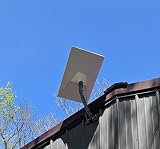
Starlink Gen 3 Pipe Adapter + J-Pole Combo Kit
Pipe/Pole Mount
All-in-one pipe adapter and J-pole mount for Gen 3 dish with two height configurations, fits standard antenna masts on RVs.
$50.00
Amazon price when we checked on Oct 9, 2026
Check today's price on Amazon(opens Amazon in a new tab)If you want a taller, sturdier free-standing mast than a packable tripod, pair the adapter with a 5 ft galvanized steel mast pipe (1.25 in OD, swedged ends so sections stack) — galvanized steel shrugs off the crosswind that flexes a cheap aluminum pole.

5 ft Galvanized Steel Antenna Mast (1.25 in OD)
Mount
$25.00
Amazon price when we checked on Oct 9, 2026
Check today's price on Amazon(opens Amazon in a new tab)Running a Mini instead? A packable Anautin telescopic tripod (3-level height, 360° tilt, collapses to ~6.7 in) sets the small dish on the ground in seconds and stows in a cabinet — the easiest way to walk the Mini to a clear patch of sky. Before you commit to a pole height, read how tall your pole needs to be and our tips to fix obstructions so you buy enough reach the first time.

Anautin Starlink Mini Telescoping Tripod Mount
Mount
$31 – $38
Amazon price when we checked on Oct 9, 2026
Check today's price on Amazon(opens Amazon in a new tab)Roof and permanent mounts
A permanent roof mount bolts the dish to a fixed bracket so it never needs daily setup — and it is the only category that supports reliable in-motion use. The trade-off is drilling, leak risk, and a fixed aiming angle.
Pros: set-and-forget, in-motion capable, nothing to deploy. Cons: roof penetrations and seal-failure risk, plus a fixed Gen 3 angle. The Gen 3 is fixed-position hardware — the dish sits roughly 8° from horizontal and you cannot re-aim it once mounted, so install angle and rigid hardware matter. A flimsy bracket invites wobble or a $500+ dish crash at highway speed.
Permanent makes sense when you move often, want internet the moment you stop, or need in-motion connectivity. If you want the roof position without holes, skip ahead to sled mounts — and compare every drill-free option in our best no-drill mounts ranked.
Non-penetrating sled mounts
A non-penetrating sled mount uses gravity and counterweights to hold the dish on your roof without a single hole. It is the best of both worlds for full-timers and renters: a permanent-feeling roof position that is fully reusable and preserves your roof seal.
Pros: zero penetrations, no leak risk, reusable and relocatable, marketed to hold in 100+ mph winds. Cons: adds ballast weight (typically ~13 lb of counterweight) and works best on a ridge or flat section.
The Neeotyy no-drill roof mount ($80–120) ships with a 13 lb counterweight panel and pipe adapter and suits ridge or flat roofs.

Neeotyy No-Drill Gen 3 Roof Mount (13 lb counterweight)
Sled Mount
Ballasted no-drill mount for ridge or flat roofs with pre-integrated 13 lb counterweight panel and pipe adapter — ideal for RVs that can't risk roof penetrations.
$104.49
Amazon price when we checked on Oct 9, 2026
Check today's price on Amazon(opens Amazon in a new tab)For roof peaks specifically, the SSCEHCNY roof ridge mount ($90–130) is a ridge-clamp design with included 13 lb counterweights — a heavier-duty alternative.

SSCEHCNY Gen 3 Roof Ridge Mount (13 lb counterweights)
Sled Mount
Non-penetrating ridge clamp design with included 13 lb counterweights — installs on RV or trailer roof peaks with zero drilling, preserving the rubber roof seal.
$104.45
Amazon price when we checked on Oct 9, 2026
Check today's price on Amazon(opens Amazon in a new tab)For the full install walkthrough, see our non-penetrating sled mount guide.
Permanent vs temporary: how to choose
The choice between a permanent and temporary Starlink mount comes down to two factors: how often you move and whether you need internet while driving. There is no universally "best" mount — there is only the best mount for your pattern.
| You are a... | Move pattern | Best mount type |
|---|---|---|
| Full-timer, stationary months | Rarely move, set-and-forget | Roof / sled |
| In-motion streamer | Internet while driving | Permanent roof |
| Weekend camper | New site every few days | Hitch or ladder |
| Boondocker in trees | Chase clear sky | Ground pole / tripod |
| Renter / lease limits | No roof mods allowed | Sled or tripod |
In short: if you mostly sit still or drive online, go permanent or sled. If you move and re-aim, go hitch, ladder, or ground pole. Add the EAZUSE Ethernet adapter ($15–25) to any setup if you want a weatherproof extension or splice on a Gen 3 or Mini cable without cutting it.

EAZUSE Starlink Ethernet Adapter (Gen 3/Mini)
Ethernet Adapter
Waterproof SPX-to-RJ45 adapter for Starlink Gen 3 and Mini, adds a wired Ethernet port without cutting cables.
$26.09
Amazon price when we checked on Oct 9, 2026
Check today's price on Amazon(opens Amazon in a new tab)Airstream and aluminum-trailer mounting
Airstream and other aluminum-skinned trailers are a special case because magnets do not stick to aluminum — it is not a ferrous metal, so magnetic mounts simply will not hold. This is the single most common mounting mistake on aluminum rigs.
There are three proven workarounds. First, bond steel discs with VHB tape to the roof to create magnetic anchor points, then use a magnetic mount on those discs. Second, bolt a telescoping pole to the A-frame tongue, which can raise the dish as high as ~24 ft for excellent clearance. Third, mechanically bolt or screw the unit to a solid point.
Best pole for Airstream trailers
On Airstream forums the Flagpole Buddy sectional kit is the repeated community favorite for aluminum trailers — it bolts to a ladder or A-frame rather than relying on magnets. If you run a Mini and want the magnetic route, the Lymorexan magnetic mount ($20–40) works only once you have VHB steel discs in place to give the magnets something ferrous to grab.
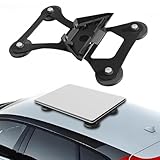
Lymorexan Magnetic Roof Mount (Mini)
Magnetic Mount
$39.98
Amazon price when we checked on Oct 9, 2026
Check today's price on Amazon(opens Amazon in a new tab)Those steel discs are the missing piece that makes the magnetic route work on aluminum. The Mob Armor MobNetic plate set gives you 3M VHB-backed steel discs to bond to the skin, turning any spot on an Airstream roof or A-frame into a magnet-ready anchor point.

Mob Armor MobNetic Steel Mounting Plates (6-pack)
Mount
$35.99
Amazon price when we checked on Oct 9, 2026
Check today's price on Amazon(opens Amazon in a new tab)Frequently asked questions
Do I need to drill holes to mount Starlink on my RV? No. Ladder, hitch, ground pole, tripod, and non-penetrating sled mounts are all no-drill. Only a fixed roof bracket requires penetrations.
Does the Gen 3 dish include a pole mount? No — it ships with a kickstand only. You need a Gen 3 pipe adapter (fits 1.25–2.5 in poles; use 1.5 in).
How tall should my pole be? Tall enough to clear your obstructions; ~14 ft is a common target for tree-heavy sites.
Related reading
- Ladder vs hitch mount for Starlink RV
- Best no-drill Starlink RV mounts
- Non-penetrating Starlink sled mount guide
- Starlink pole mount height for RV
- Starlink RV obstruction tips
What to do next
Pick your mount from the decision table above, then prep the rest of the install. Run the full parts list with the Gen 3 accessory checklist, plan your wiring with the cable routing guide, and learn how to store and protect the dish between trips so a temporary mount lasts for years.
Affiliate disclosure
This page may include affiliate links. If you purchase through them, we may earn a commission at no extra cost to you.